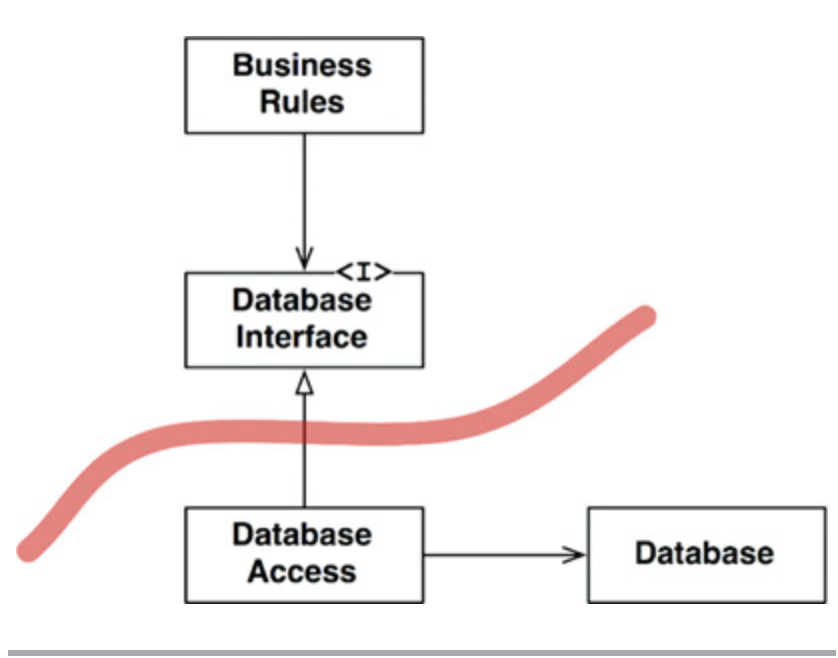
While SwiftData provides a smooth developer experience thanks to its macro-based integration and built-in support for @Model, @Query, and @Environment(\.modelContext), it introduces a major architectural concern: tight coupling between persistence and the UI layer.
When you embed SwiftData directly into your views or view models, you violate clean architecture principles like separation of concerns and dependency inversion. This makes your code:
To preserve the testability, flexibility, and scalability of your app, it’s critical to isolate SwiftData behind an abstraction.
In this tutorial, we’ll focus on how to achieve this isolation by applying SOLID principles, with a special emphasis on the Dependency Inversion Principle. We’ll show how to decouple SwiftData from the view and the view model, making your app cleaner, safer, and future-proof, ensuring your app's scalability.
View the full source code on GitHub: https://github.com/belkhadir/SwiftDataApp/
The example you'll see shortly is intentionally simple. The goal is clarity, so you can follow along easily and fully grasp the key concepts. But before diving into the code, let's understand what we mean by boundaries, as clearly defined by Uncle Bob (Robert C. Martin):
“Those boundaries separate software elements from one another, and restrict those on one side from knowing about those on the other.”
In our app, when a user taps the “+” button, we add a new Person. The UI layer should neither know nor care about how or where the Person is saved. Its sole responsibility is straightforward: display a list of persons.
Using something like @Query directly within our SwiftUI views violates these boundaries. Doing so tightly couples the UI to the persistence mechanism (in our case, SwiftData). This breaks the fundamental principle of Single Responsibility, as our views now know too much specific detail about data storage and retrieval.
In the following sections, we’ll show how to respect these boundaries by carefully isolating the persistence logic from the UI, ensuring each layer remains focused, clean, and maintainable.
First, let’s clearly outline our requirements. Our app needs to perform three main actions:
To ensure these operations are not directly tied to any specific storage framework (like SwiftData), we encapsulate them inside a protocol. We’ll name this protocol PersonDataStore:
public protocol PersonDataStore {
func fetchAll() throws -> [Person]
func save(_ person: Person) throws
func delete(_ person: Person) throws
}
Next, we define our primary entity, Person, as a simple struct. Notice it doesn’t depend on SwiftData or any other framework:
public struct Person: Identifiable {
public var id: UUID = UUID()
public let name: String

public init(name: String) {
self.name = name
}
}
These definitions (PersonDataStore and Person) become the core of our domain, forming a stable abstraction for persistence that other layers can depend upon.
Now that we have our Domain layer clearly defined, let’s implement the persistence logic using SwiftData. We’ll encapsulate the concrete implementation in a dedicated framework called SwiftDataInfra.
First, we define a local model called LocalePerson. You might wonder why we create a separate model rather than directly using our domain Person entity. The reason is simple:
import SwiftData

@Model
final class LocalePerson: Identifiable {
@Attribute(.unique) var name: String

init(name: String) {
self.name = name
}
}
Note that we annotate it with @Model and specify @Attribute(.unique) on the name property, signaling to SwiftData that each person’s name must be unique.
To implement persistence operations (fetch, save, delete), we’ll use SwiftData’s ModelContext. We’ll inject this context directly into our infrastructure class (SwiftDataPersonDataStore) via constructor injection:
import Foundation
import SwiftData
import SwiftDataDomain

public final class SwiftDataPersonDataStore {
private let modelContext: ModelContext

public init(modelContext: ModelContext) {
self.modelContext = modelContext
}
}
Our infrastructure class will now conform to our domain protocol PersonDataStore. Here’s how each operation is implemented:
1. Fetching all persons:
public func fetchAll() throws -> [Person] {
let request = FetchDescriptor<LocalePerson>(sortBy: [SortDescriptor(\.name)])
let results = try modelContext.fetch(request)

return results.map { Person(name: $0.name) }
}
FetchDescriptor to define our query, sorting persons by their name.LocalePerson (infra model) to a plain Person entity (domain model), maintaining isolation from SwiftData specifics.2. Saving a person:
public func save(_ person: Person) throws {
let localPerson = LocalePerson(name: person.name)

modelContext.insert(localPerson)
try modelContext.save()
}
LocalePerson instance.3. Deleting a person:
public func delete(_ person: Person) throws {
let request = FetchDescriptor<LocalePerson>(sortBy: [SortDescriptor(\.name)])
let results = try modelContext.fetch(request)
guard let localPerson = results.first else { return }

modelContext.delete(localPerson)
try modelContext.save()
}
Our ViewModel is placed in a separate framework called SwiftDataPresentation, which depends only on the Domain layer (SwiftDataDomain). Crucially, this ViewModel knows nothing about SwiftData specifics or any persistence details. Its sole responsibility is managing UI state and interactions, displaying persons when the view appears, and handling the addition or deletion of persons through user actions.
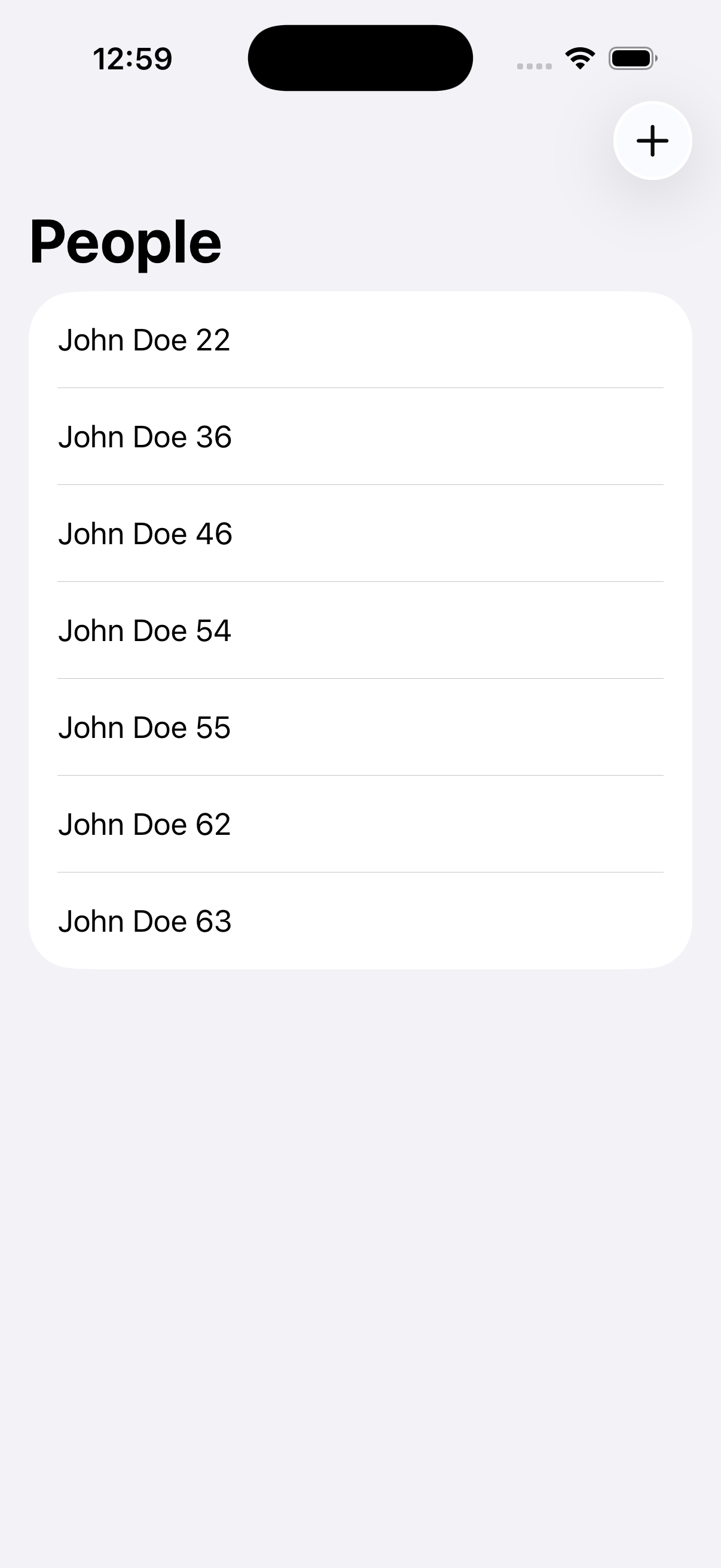
Here’s the ViewModel implementation, highlighting dependency injection clearly:
public final class PersonViewModel {
// Dependency injected through initializer
private let personDataStore: PersonDataStore

// UI state management using ViewState
public private(set) var viewState: ViewState<[Person]> = .idle

public init(personDataStore: PersonDataStore) {
self.personDataStore = personDataStore
}
}
PersonDataStore is injected into the PersonViewModel through its initializer.PersonDataStore protocol, the ViewModel remains agnostic about which persistence implementation it’s using (SwiftData, Core Data, or even an in-memory store for testing purposes).PersonDataStore is Used:public func onAppear() {
viewState = .loaded(allPersons())
}
public func addPerson(_ person: Person) {
perform { try personDataStore.save(person) }
}
The ViewModel delegates saving the new person to the injected store, without knowing how or where it happens.
public func deletePerson(at offsets: IndexSet) {
switch viewState {
case .loaded(let people) where !people.isEmpty:
for index in offsets {
    let person = people[index]
    perform { try personDataStore.delete(person) }
}
default:
break
}
}
Similarly, deletion is entirely delegated to the injected store, keeping persistence details completely hidden from the ViewModel.
Now that we've built clearly defined layers, Domain, Infrastructure, and Presentation, it's time to tie everything together into our application. But there's one important rule: the way we compose our application shouldn't compromise our carefully crafted boundaries.
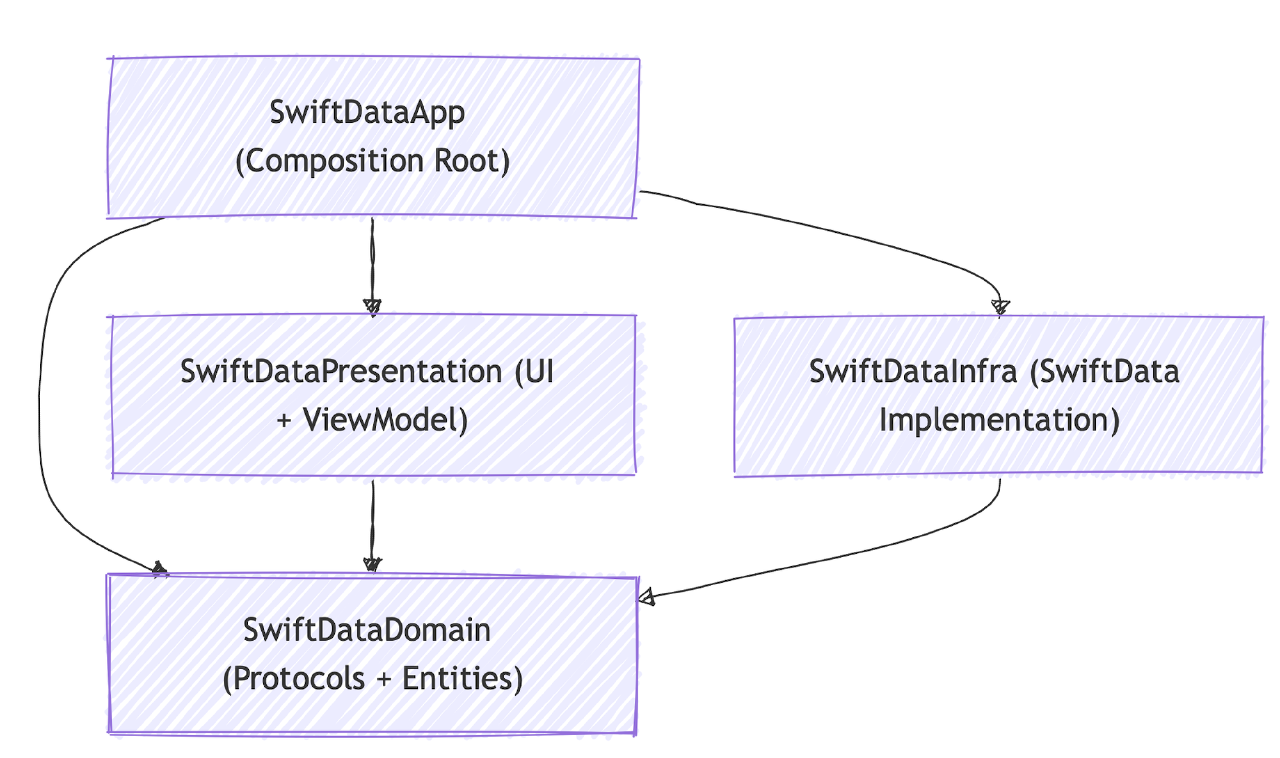
Our application's entry point, SwiftDataAppApp, acts as the composition root. It has full knowledge of every module, enabling it to wire dependencies together without letting those details leak into the inner layers:
import SwiftUI
import SwiftData
import SwiftDataInfra
import SwiftDataPresentation

@main
struct SwiftDataAppApp: App {
let container: ModelContainer

init() {
// Creating our SwiftData ModelContainer through a factory method.
do {
    container = try SwiftDataInfraContainerFactory.makeContainer()
} catch {
    fatalError("Failed to initialize ModelContainer: \(error)")
}
}

var body: some Scene {
WindowGroup {
    // Constructing the view with dependencies injected.
    ListPersonViewContructionView.construct(container: container)
}
}
}
By encapsulating SwiftData logic within the Infrastructure layer and adhering strictly to the PersonDataStore protocol, we’ve achieved a powerful separation: